

For Students
AI Resume Builder on UptoSkills: The Complete Guide
Pick from 21 templates, let AI tighten the wording and check your ATS score, then export a clean PDF -- here’s everything the resume builder can do.
Updated 22 Sept 2026
Short answer: Pick one of 21 templates, fill it in (or let AI parse an old resume for you), use the AI tools to tighten the wording and check your score, then export a clean PDF. Free gets you 1 resume with a small logo on the PDF; Pro gets 10 resumes, no logo, and the full AI toolkit.
Starting a resume
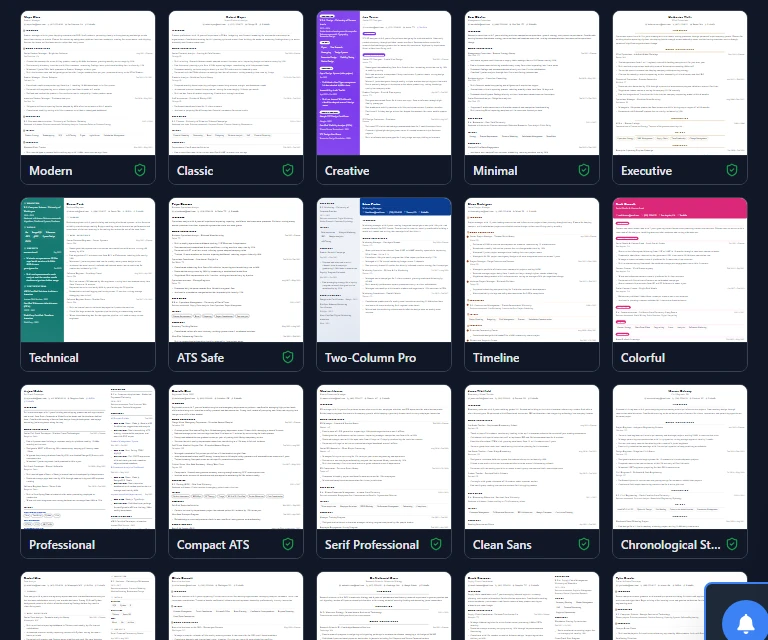
From Resume Builder in your dashboard, you've got two ways in:
| Option | What happens |
|---|---|
| New resume | Opens the template picker. Click a template to preview it full-size with real example content, then confirm with Use this template — nothing is created until you do. |
| Upload old resume | Upload a PDF/DOC/DOCX of a resume you already have and AI reads it into the editor's fields automatically. See the upload guide. |
🎯 The template preview isn't a guess — it shows the exact sample content and layout you'll get, so a misclick doesn't cost you one of your limited resume slots.
21 templates, 15 of them ATS-safe
Every template is tagged ATS Safe when it's built to parse cleanly through applicant tracking software (single column, no tables or graphics that confuse a parser). 15 of the 21 are ATS-safe; the rest (Creative, Technical, Two-Column Pro, Timeline, Colorful, Professional) lean more visual, for roles where design matters more than parsing.
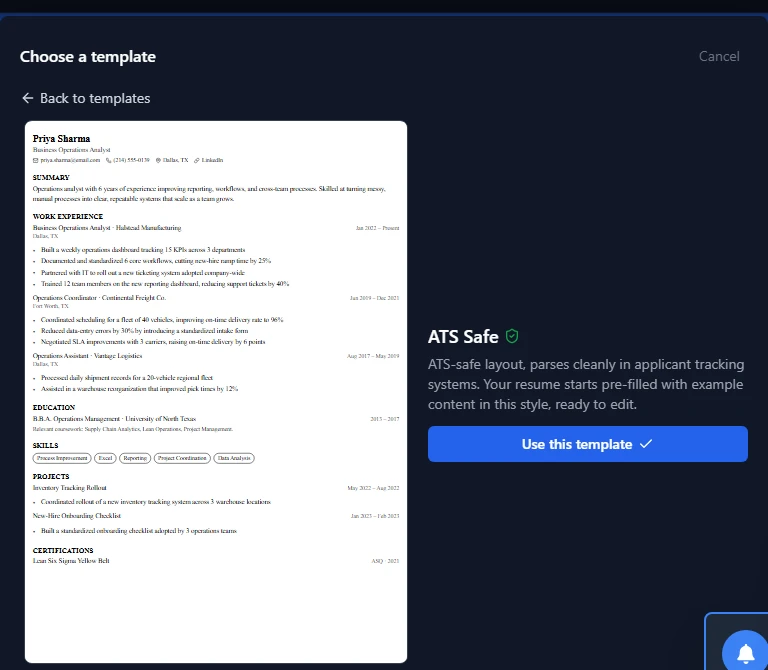
⚠️ Applying to a large company or a campus placement drive that runs resumes through a parser first? Pick an ATS-safe template. A two-column, graphic-heavy layout can get key fields scrambled or dropped by the parser before anyone ever reads it.
The editor
The canvas is a live preview of your PDF — what you see while editing is what gets exported, margins and page breaks included. Along the top: Add section (experience, projects, custom sections, and more), Rearrange to reorder sections, Templates to switch styles, and Export to download. On the left, a Design panel lets you change fonts, accent colour, bullet style, and spacing without touching a template file.
Resume score, right there while you edit
A score out of 100 sits next to the editor at all times, no job description needed — broken into ATS parse rate, Format and size, and Design. It updates as you edit, so you can see a change help or hurt your score immediately.
The AI toolkit
Five AI tools live in the same panel as your score, each with its own small daily limit so the good stuff doesn't get rationed to nothing on a busy day:
| Tool | What it does |
|---|---|
| Check writing | Spelling and grammar pass over the whole resume |
| Tailor to a job | Paste a job ad, pick which qualifications to emphasise, and it rewrites toward that role |
| Job match score | Paste a job ad and see how well your resume matches it specifically (separate from the always-on resume score) |
| Resume report | A grade plus a written pass on grammar and wording |
| Recruiter checks | Nine specific things a recruiter looks for in the first few seconds |
There's also an inline "Improve text" / "Suggest content" option on individual bullets and a skills suggester, both covered in the AI writing tools guide.
Free versus Pro
| Free | Pro | |
|---|---|---|
| Resumes | 1 | 10 |
| PDF export | Small logo on the page | No logo |
| Templates | 5 (all ATS-safe) | All 21 |
| AI tools | None | Full toolkit, daily limits per tool |
| Upload & auto-fill | 1 a day | 5 a day |
The full breakdown, including exact daily limits per AI tool, is in the Free vs Pro guide.
Common questions
Does editing look different from the exported PDF?
No — the canvas is styled to match the PDF exactly, margins and page breaks included, so what you see while editing is what you download.
What happens if my resume runs onto a second page?
The editor shows the second page directly in the canvas, with the same template, sidebar, and margins as the first — you don't need to export to see it.
Can I switch templates after I've already written everything?
Yes, from Templates in the top bar. Your content carries over; only the layout and styling change.
Does a failed AI action use up my daily limit?
No. If an AI call fails (a slow response, a dropped connection), the usage counter is refunded automatically — you only spend a use on a completed result.