

How to Create or Join a Team for Hackathons on UptoSkills
Learn how to create or join a team for UptoSkills hackathons! This guide covers team formation, invitations, and management for successful collaboration.
📋 Overview
All hackathons and competitions on UptoSkills require you to be part of a team even if you are alone for our system to work perfectly. This guide will walk you through creating your own team or joining an existing one.
🎯 Understanding Team Requirements
Before you start, check your event's team requirements:
- Team Size: Most events require 1-5 members (depends on the event)
- Solo Participation: Some events allow individual participation but team creation is mandatory
- Team Leader: The person who creates the team becomes the team leader
- Registration: You must be registered for the event before creating/joining a team
✨ Option 1: Create Your Own Team
Step 1: Navigate to My Competitions pagez
- Go to your Registered Competitions page
- Find the event you participated in
- Click the "Create/Join Team" button on the event card

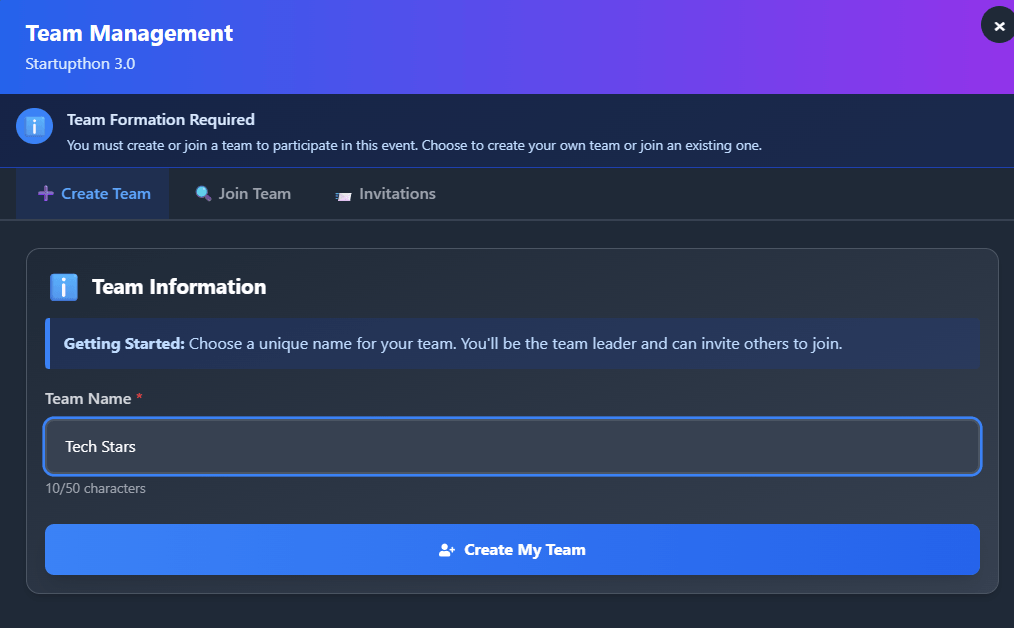
Step 2: Create Team
- Click "Create Team" button
- Enter your Team Name (make it unique and memorable!)
- Click "Create My Team" to confirm
🎉 Congratulations! You're now the team leader.
Step 3: Invite Team Members
You have three ways to invite members:
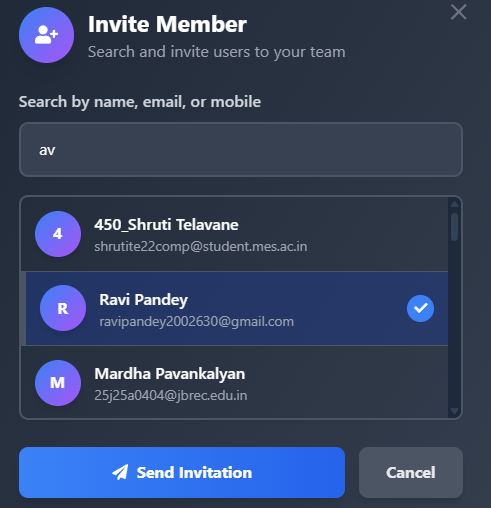
Method 1: Direct Invitation
- Enter the Email of your teammate
- Click "Send Invitation"
- They'll receive a notification to accept
- Please note: For direct Invitation to work they must be registered on the event.
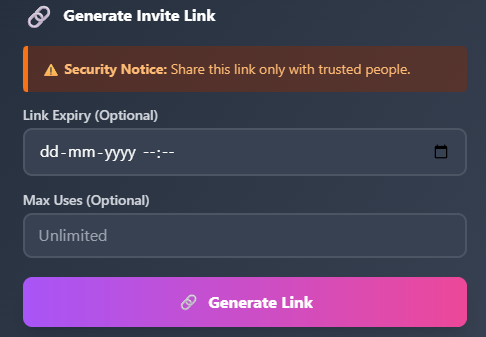
Method 2: Share Invite Link
- Click "Generate Invite Link"
- Copy the link and share it with your teammates
- Anyone with the link can join (until team is full)
Method 3: Accept Join Requests
- Other participants can request to join your team
- You'll see pending requests in the "Join Requests" tab
- Click "Accept" or "Reject" for each request
🤝 Option 2: Join an Existing Team
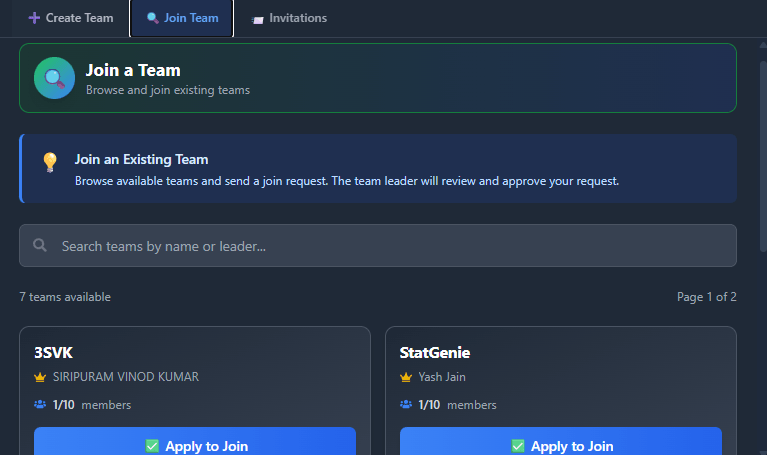
Step 1: Browse Available Teams
- Go to "Create/Join Team" for your event
- Click on "Join Team" tab
- Browse the list of teams looking for members
Step 2: Request to Join
- Find a team that interests you
- Click "Request to Join"
- Wait for the team leader to accept your request
Step 3: Join via Invite Link
If someone shared an invite link with you:
- Click the invite link
- You'll be redirected to the team page
- Click "Join Team" to confirm
- You're in! 🎊
👥 Managing Your Team
As Team Leader:
- ✅ Add/Remove Members: Manage your team roster
- ✅ Accept Join Requests: Review and approve requests
- ✅ Update Team Name: Change team name if needed
As Team Member:
- ✅ View Team Details: See all team members
⚠️ Important Rules
Team Formation Rules:
- One Team Per Event: You can only be in one team per event
- Registration Required: All team members must be registered for the event
- Team Size Limits: Respect the minimum and maximum team size
- Deadline: Teams must be formed before the event deadline
🔧 Troubleshooting
"Invite Link Not Working"
Possible reasons:
- Link has expired
- Team is already full
- You're already in another team
Solution: Contact the team leader for a new link
"Can't Find Team to Join"
Possible reasons:
- All teams are full
- No teams are actively recruiting
- Event hasn't started team formation
Solution: Create your own team or wait for new teams
💡 Pro Tips
For Team Leaders:
- Choose a Clear Team Name: Make it easy to identify
- Set Expectations: Discuss roles and responsibilities early
- Communicate Regularly: Use our inbuilt Chat System
- Verify Skills: Ensure team has diverse skill sets
- Plan Ahead: Don't wait until the last minute
For Team Members:
- Be Active: Respond to invitations promptly
- Show Commitment: Only join if you can participate fully
- Communicate: Keep your team updated on your progress
- Respect Deadlines: Submit your work on time
- Be a Team Player: Collaborate and support each other
Views: 248Updated: 11/27/2025