

For HR's / Corporates
Offer Letter Studio: Building Your Offer Template
The visual offer letter designer — what you can lay out, the compensation and joining fields it fills in, the company seal and verification mark, and why it needs a desktop.
Updated 19 Aug 2026
Short answer: Offer Letter Studio is a visual designer for your offer letters. Build a template once, and it is available whenever you release an offer from a job's Offer Release tab.
🖥️ The studio needs a desktop screen. It will tell you so on a phone rather than giving you a cramped version.
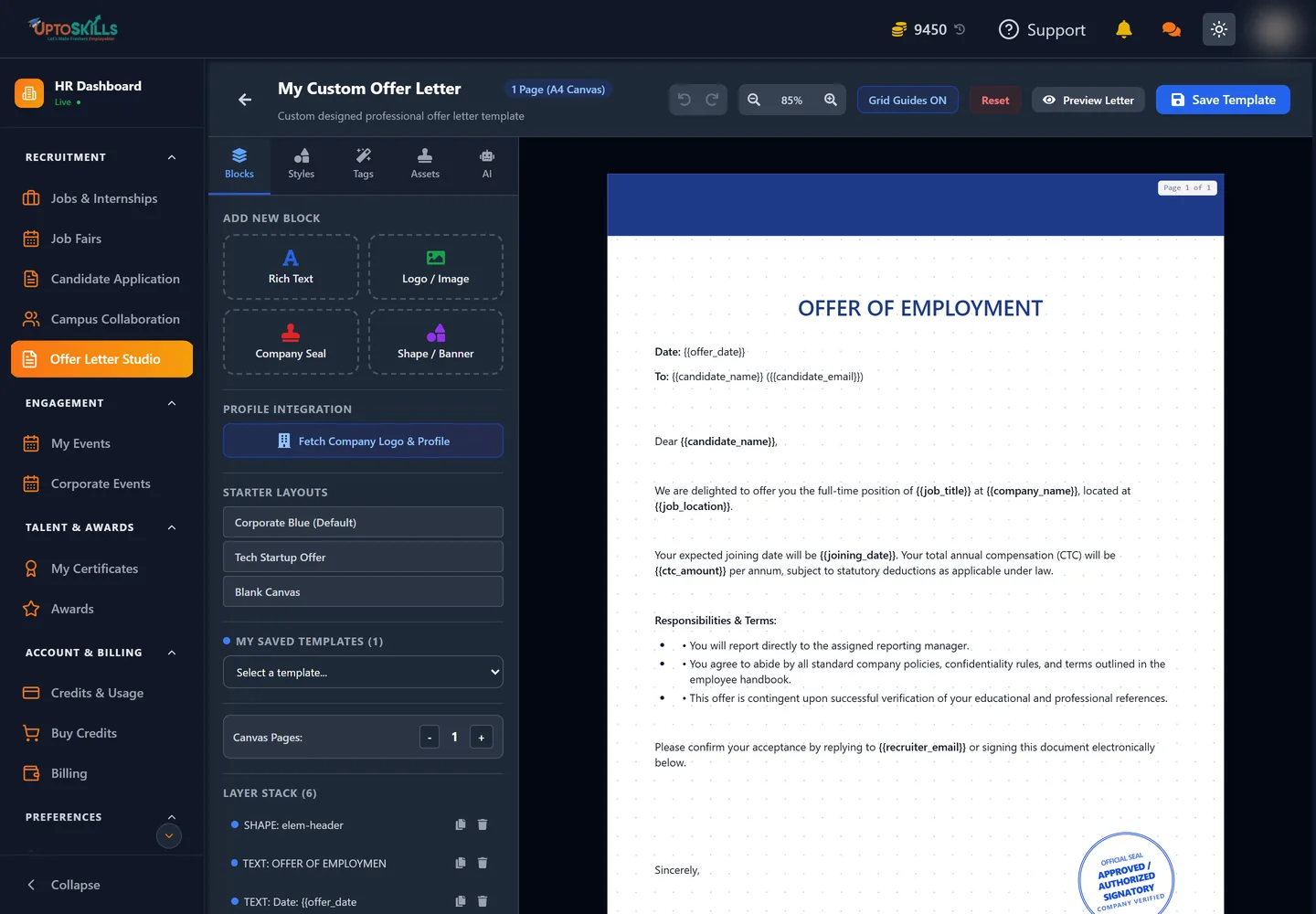
What you are building
A multi-page canvas you lay out yourself, with control over background colour, corner radius and the position of every block. It is a design surface rather than a form with a fixed shape.
The blocks that matter
| Block | What it carries |
|---|---|
| Compensation & Benefits | Base salary and the rest of the package |
| Joining Date | When the candidate is expected to start |
| Company Seal | Your seal or stamp image |
| Company Verified | A mark showing the issuing company passed UptoSkills verification |
| Canvas Pages | Add pages for terms, annexures and policies |
The Company Verified mark is worth including. Candidates receive offers from all sorts of places, and a verification mark tied to the platform is a signal your letter is genuine.
The five panels
The left side of the studio has five tabs, and knowing which does what removes most of the hunting:
| Tab | What it is for |
|---|---|
| Blocks | Add a new element — Rich Text, Logo / Image, Company Seal or Shape / Banner |
| Styles | Fonts, colours, spacing and corner radius for the selected block |
| Tags | The placeholders that fill themselves in per candidate |
| Assets | Images you have uploaded, plus your company logo and profile picture |
| AI | Generate letter wording from a prompt |
Below the tabs sit three more useful things: Fetch Company Logo & Profile, which pulls your branding in without a manual upload; Starter Layouts — Corporate Blue, Tech Startup Offer and Blank Canvas; and the Layer Stack, which lists every block on the page so you can select, duplicate or delete one that is hidden behind another.
Placeholders do the repetitive work
Anything wrapped in double braces is replaced with the real value when the offer goes out. Twelve are available:
| Placeholder | Becomes |
|---|---|
{{candidate_name}} | The candidate's name |
{{candidate_email}} | Their email address |
{{job_title}} | The role they are being offered |
{{job_location}} | Where the role is based |
{{joining_date}} | Their expected start date |
{{ctc_amount}} | Total annual compensation |
{{offer_date}} | The date the letter is issued |
{{company_name}} | Your company name |
{{company_logo}} | Your logo |
{{hr_name}} / {{hr_designation}} | The signatory's name and title |
{{recruiter_email}} | The address the candidate replies to |
✏️ Type a placeholder exactly, braces included. A misspelt tag is printed literally on the letter rather than replaced — which is what Preview Letter is for.
Working on the canvas
The canvas is a real A4 page, 794 × 1123 points, shown at 85% by default with zoom controls in the header. Grid Guides helps you line blocks up; Canvas Pages adds pages for terms, annexures and policies; and Reset clears the board back to the starting layout.
Because it is a true A4 page, what you see is what prints. Blocks pushed near the edge will sit near the edge on paper, so leave a margin.
Build it before you need it
Releasing an offer is the point in hiring with the least slack — a candidate is waiting and often holding another offer. Designing a letter from scratch at that moment is avoidable. Build the template when things are quiet, and the Offer Release tab becomes a matter of filling in a name and a number.
What it costs
Building and saving templates is free. The charge sits on the other side: marking a candidate Selected costs 500 coins on the default rate, once per candidate, regardless of how many templates you have made.
Where to go next
- Inside a Job: The Six Tabs — where Offer Release sits
- What Everything Costs