

For HR's / Corporates
Candidate Application: All Your Applicants in One List
The dashboard-wide applicant view — how it differs from a single job’s Applications tab, and when each one is the right place to work.
Updated 19 Aug 2026
Short answer: Candidate Application shows applicants across every role you have posted, rather than one job at a time. Same candidates, wider lens.
🔍 Working a single role? Use the job's own Applications tab. Looking across everything? Use this.
How the two views differ
| Candidate Application | A job's Applications tab | |
|---|---|---|
| Scope | Every role you have posted | One role |
| Best for | Spotting someone who applied to several roles; a weekly sweep | Working one pipeline end to end |
| Stage actions | Limited — the pipeline belongs to the job | Full — unlock, invite, advance, release offers |
Unlocking is recorded per job and per candidate, so a person who applied to two of your roles is unlocked separately on each. That is worth remembering when you spot the same name twice: unlocking them on one role does not reveal them on the other.
The two tabs
The page opens on Event and most people want the other one. Jobs/Internships is your hiring pipeline; Event lists people who registered for events you hosted, which is a different audience entirely. If the page looks empty, check which tab you are on before anything else.
What the page shows
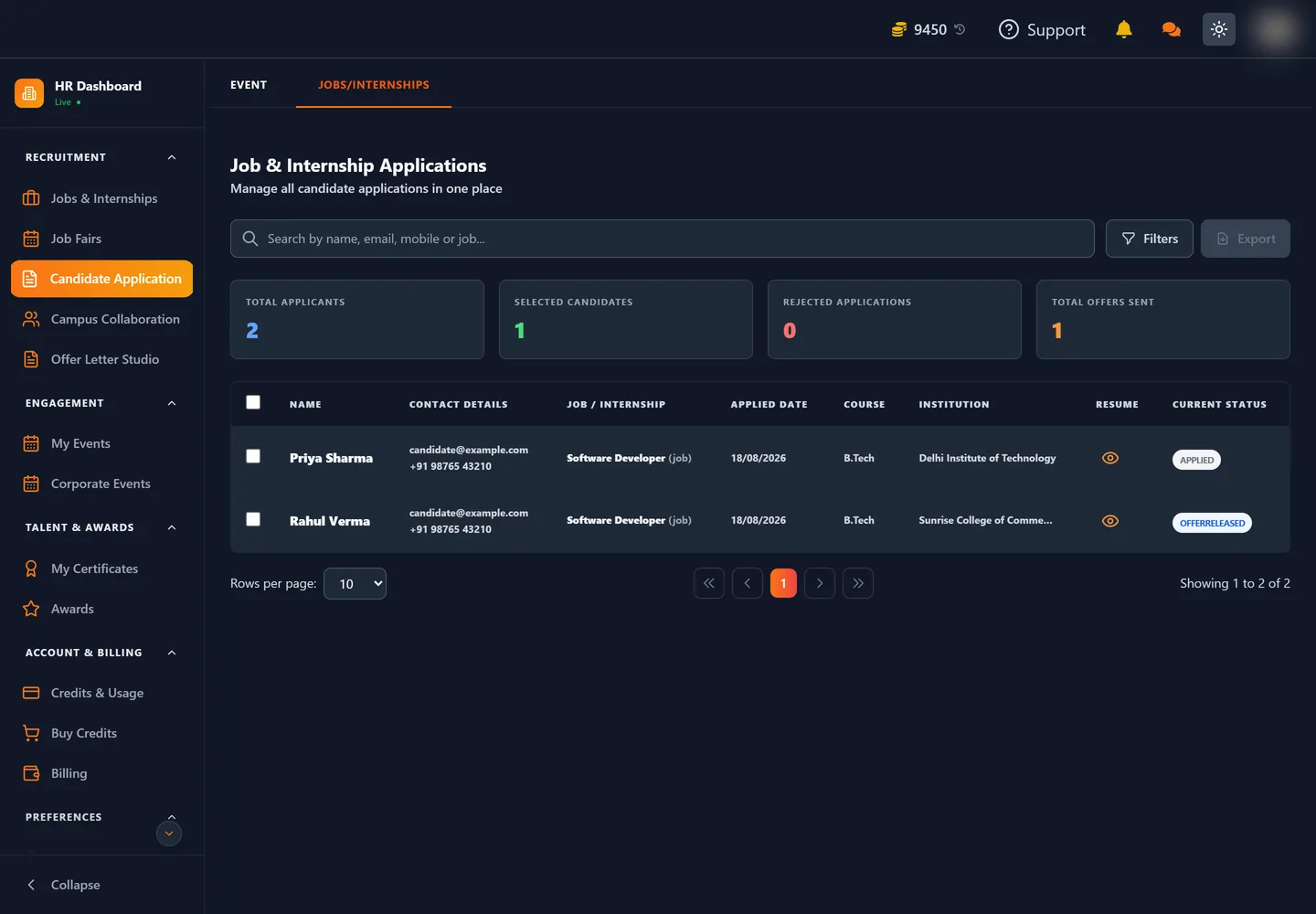
Four counters run across the top — Total Applicants, Selected Candidates, Rejected Applications and Total Offers Sent — giving you the shape of everything in flight in one line.
Below them, one row per applicant:
| Column | What it tells you |
|---|---|
| Name | The candidate, once unlocked |
| Contact Details | Email and mobile, once unlocked |
| Job / Internship | Which of your roles they applied to, and which type |
| Applied Date | When they applied |
| Course and Institution | What and where they studied — visible before unlocking |
| Resume | An eye icon to open the CV |
| Current Status | Where they sit — Applied, Offer Released and so on |
Course and Institution show before you unlock anyone, which is the point of the view: you can judge fit and decide who is worth 5 coins without paying to find out.
A search box covers name, email, mobile and job together, Filters narrows the list further, and Export takes the current selection out as a file.
When the wider view earns its place
- A candidate applying repeatedly is telling you something. They want to work for you specifically, and they may fit a role they did not apply to.
- A weekly sweep across everything catches applications sitting untouched on a role you have not opened lately.
- Comparing roles — if one job draws applicants and another does not, the difference is usually in the post, not the market.
If it looks empty
An empty list means no applications on any live role yet. Check the job is Public rather than Private, that it has not expired, and that the eligibility filters on step 2 — distance radius, restricted cities, verified-mobile-only — are not narrower than you intended.
Where to go next
- Unlocking Candidate Applications
- Every Field on the Job Posting Form — the filters that decide who can apply