

Git and GitHub
by UptoSkills Team
Missions
6
Quests
35
Games
17
XP
500
Coins
35
Certificate optional — ₹399, or ₹199 on Pro
Key Benefits
Earn XP & Level Up
Gain 500 XP to unlock badges and achievements
Collect Coins
Earn 35 coins to redeem rewards
Professional Certificate
QR-verified and recruiter-checkable — ₹399, or ₹199 on Pro
Unlock Achievements
Complete challenges and earn exclusive badges
Certificate Preview
Finish the league and this is what you walk away with.
We'll post you a printed copy — free.
Tick one box at checkout and it ships anywhere in India in 14–21 days. Almost nobody here does this free.
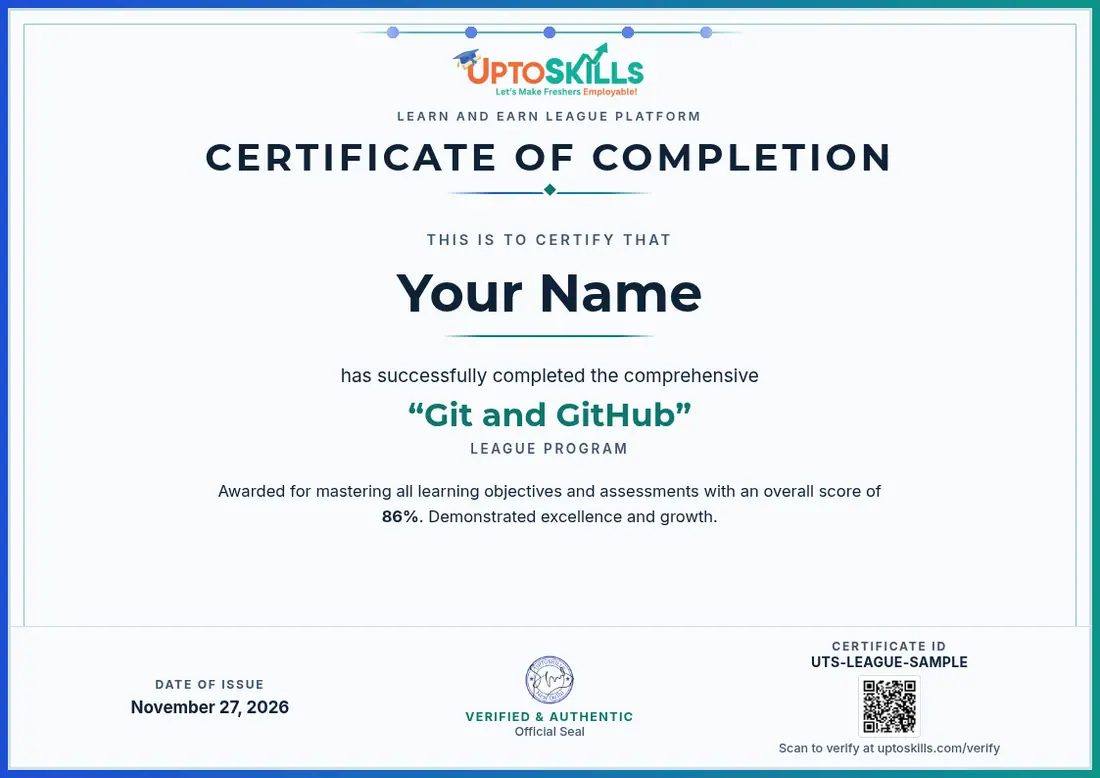
✨ QR-verified · high-quality PDF
Every lesson, quest and game here is free. Forever.
Standard
₹399
one-time
With Pro
₹199
per certificate
So why isn't the certificate free? One anybody can print is worth nothing to a recruiter. The fee covers evaluation, QR-backed verification and lifetime hosting — that's what makes it checkable.
Hall of Fame
About This League
Mastering Git and GitHub is an essential step for any aspiring web developer, transforming how you approach projects and collaborate with others. It's not just about writing code; it's about managing that code effectively, understanding its history, and working seamlessly within development teams. This League will equip you with the fundamental knowledge and practical skills to version control your web development projects, making your development process more robust, organized, and efficient.
Think of Git as a time machine for your code. Every change you make can be saved, reviewed, and even reverted if something goes wrong. GitHub, on the other hand, acts as a central, cloud-based hub for all your Git-managed projects, enabling you to share your work, receive contributions from others, and manage complex development workflows. Together, they form the backbone of modern software development, widely adopted across solo projects, startup teams, and massive enterprise environments.
By the end of this League, you'll be comfortable navigating your project's history, understanding the flow of changes, and participating in collaborative development processes, laying a solid foundation for tackling more complex web development challenges.
Core Concepts of Version Control with Git
This League delves into the foundational principles that make Git such a powerful tool for developers. Understanding these concepts is crucial for leveraging Git effectively in your web development journey.
Understanding the Git Workflow
- Repository (Repo): A Git repository is essentially a project folder that contains all of your project files and a hidden `.git` directory where Git stores its metadata. This metadata tracks every change made to your project over time.
- Commit: A commit is a snapshot of your project at a specific point in time. Each commit has a unique identifier, a commit message explaining the changes, and information about who made the commit and when.
- Staging Area (Index): Before you commit changes, you can selectively add specific modified files to a staging area. This allows you to group related changes into a single, logical commit, rather than committing everything at once.
- Branching: Branches are independent lines of development within a repository. They allow you to work on new features or bug fixes without affecting the main codebase. This is invaluable for experimentation and parallel development.
- Merging: Merging is the process of integrating changes from one branch into another. Git helps manage this process, automatically combining compatible changes or alerting you to conflicts that need manual resolution.
- Remote Repositories: While Git is a distributed system, you often work with a central remote repository (like on GitHub) to share your code and collaborate. This remote repo acts as a single source of truth for the project.
Essential Git Commands for Web Developers
You'll get hands-on experience with the essential commands that form the backbone of daily Git operations:
git init: This command initializes a new Git repository in your project directory, turning it into a trackable project.git add <file>: This command stages specific files for the next commit, preparing them to be included in the snapshot.git commit -m "Your descriptive message": This command records the staged changes as a new commit in your repository's history, accompanied by a message explaining the changes.git status: This command shows you the current state of your working directory and the staging area, indicating which files have been modified, added, or are untracked.git log: This command displays the commit history of your repository, allowing you to review past changes, commit messages, and authors.git checkout <branch_name>: This command is used to switch between different branches in your repository, allowing you to navigate to specific lines of development.git merge <branch_name>: This command integrates changes from a specified branch into your current branch.
Leveraging GitHub for Collaboration and Hosting
GitHub is more than just a place to store your code; it's a powerful platform that facilitates collaboration, code review, and project management. This section covers how to effectively use GitHub in your web development projects.
Key GitHub Features for Web Development
- Remote Repository Hosting: GitHub provides a central cloud-based location to store your Git repositories, making them accessible from anywhere and enabling collaboration.
- Pull Requests (PRs): This is the cornerstone of collaborative development on GitHub. A pull request is a proposal to merge changes from one branch into another, providing a space for code review, discussion, and automated checks before merging.
- Forking: Forking creates a personal copy of someone else's repository under your own GitHub account. This allows you to experiment with changes freely without affecting the original project, and then propose your changes back through a pull request.
- Issues: The Issues feature on GitHub is a robust system for tracking bugs, feature requests, and tasks related to your project. It allows for clear communication and organization of project development.
- Cloning: The
git clonecommand downloads an entire Git repository, including its history and all its branches, from a remote source like GitHub to your local machine. - Pushing and Pulling:
git pushuploads your local commits to a remote repository, whilegit pullfetches changes from the remote repository and merges them into your local branch.
Real-World Application: Imagine you're building a personal portfolio website. You can use Git to track all your design and code changes. If you decide to try a new navigation layout, you'd create a new branch. Once you're happy with it, you'd merge it back into your main branch. If you were working with a designer, they could fork your project, make their changes, and submit a pull request for you to review and integrate.
Who is This League For?
This League is designed for individuals who are at the beginner stages of their web development journey. Whether you are just starting to learn HTML, CSS, and JavaScript, or you've built a few basic projects, this League will provide you with the essential skills to manage your code professionally.
- Absolute Beginners: If you've never encountered Git or GitHub before and are curious about how developers manage their projects, this League is your ideal starting point.
- Self-Taught Developers: Individuals building their skills independently often benefit from structured guidance on essential development tools like Git.
- Students of Web Development: Anyone enrolled in web development bootcamps or university programs will find this League complements their coding education by introducing vital workflow practices.
- Aspiring Freelancers: Understanding version control and collaboration platforms is crucial for working effectively with clients and other developers in a freelance capacity.
No prior experience with Git or GitHub is required. We will start from the very basics and build your understanding step-by-step, focusing on practical application.
Career Relevance and Project Impact
Proficiency in Git and GitHub is not just a technical skill; it's a fundamental requirement for nearly every role in professional web development. Employers universally expect candidates to be comfortable with version control systems.
Industry Standard: From front-end developers working on user interfaces to back-end engineers building APIs and DevOps specialists managing infrastructure, Git is the universal language of code management. Companies of all sizes rely on Git and platforms like GitHub, GitLab, and Bitbucket.
By mastering Git and GitHub, you demonstrate an understanding of:
- Professional Development Practices: You signal to potential employers that you understand industry best practices for code management and collaboration.
- Teamwork and Collaboration: The ability to effectively use pull requests, resolve merge conflicts, and contribute to shared codebases is a hallmark of a strong team player.
- Project Management and Stability: You gain the confidence to manage project evolution, experiment with ideas safely, and revert to stable states when necessary, leading to more reliable software.
- Open Source Contributions: This League opens the door to participating in open-source projects, a highly respected way to build experience, network, and contribute to the wider developer community.
This League will equip you with the foundational skills that are directly transferable to real-world development environments, making your profile more attractive to employers and enabling you to contribute meaningfully to any web development project.
League Structure and Outcomes
This League is structured to provide a comprehensive yet accessible introduction to Git and GitHub. It balances theoretical understanding with practical application, ensuring you gain confidence through hands-on exercises.
Learning Path
- Foundational Git Concepts: We'll start by demystifying Git's core principles, such as repositories, commits, and the staging area.
- Essential Git Commands: You will learn and practice the most commonly used Git commands through interactive examples and mini-projects.
- Branching and Merging Strategies: Understanding how to create, manage, and merge branches will be a key focus, enabling you to work on features independently.
- GitHub Workflow: We'll transition to GitHub, covering how to create repositories, clone projects, push and pull changes, and the critical concept of pull requests.
- Collaborative Development: You'll explore how to fork repositories, submit pull requests, and participate in code reviews, simulating real team environments.
- Conflict Resolution: Learning to identify and resolve merge conflicts is a vital skill that this League will address.
By the conclusion of this League, you will be able to confidently initialize Git repositories, track changes, commit your work effectively, create and manage branches, and collaborate with others using GitHub's platform through pull requests. You will be well-prepared to integrate these essential skills into your personal web development projects and ready to contribute to team-based development environments.
Prerequisites
- Basic computer literacy
- Familiarity with command-line interface (CLI) usage
- Understanding of basic file system navigation
- Ability to follow instructions and solve simple technical problems
Learning Objectives
- Understand the core concepts of version control systems and the role of Git in managing code changes.
- Create a local Git repository, add files, and make initial commits to track project history.
- Clone existing Git repositories from GitHub and navigate their commit history.
- Implement basic branching strategies to work on new features or bug fixes independently.
- Commit changes to a branch and switch between different branches in a local repository.
- Push local commits to a remote GitHub repository and pull updates from it.
Earn XP • Collect Coins • Unlock Achievements