

How to Add and Invite Students in the UptoSkills College Hub
Add students one at a time or import a whole batch from Excel, then track who accepted the invite and who still needs a nudge.
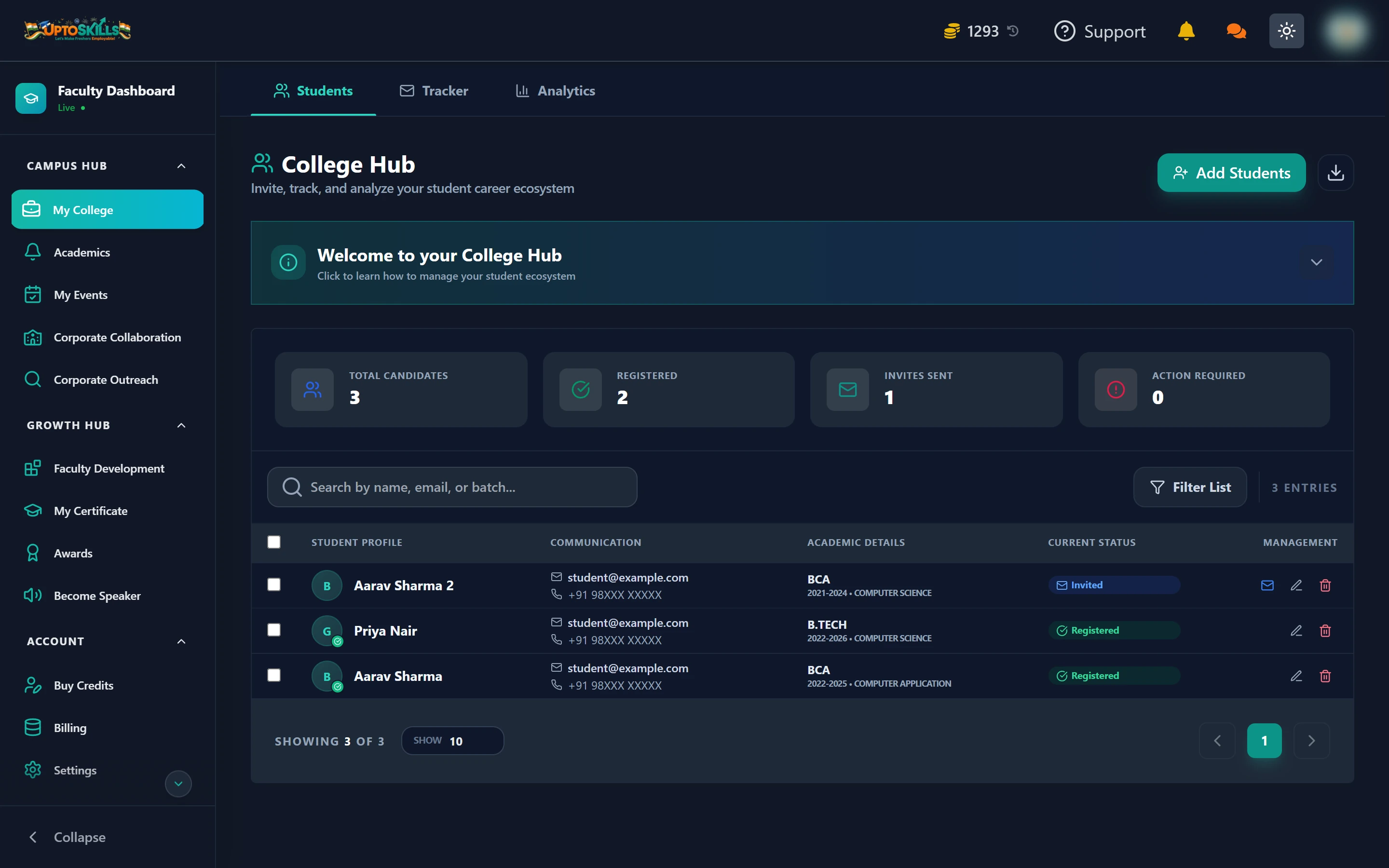
Short answer: Open My College → Students → Add Students. Add one student manually, or upload an Excel/CSV file to import an entire batch. Each student gets an email invite with a private registration link, and the roster shows you who has accepted.
The four numbers at the top
| Counter | What it means |
|---|---|
| Total Candidates | Everyone on your roster, invited or not |
| Registered | Students who accepted the invite and now have an account |
| Invites Sent | Invited but not registered yet |
| Action Required | Entries that need you to fix something before they can be invited |
📊 The gap between Invites Sent and Registered is the number worth watching. That is your follow-up list.
Option 1 — add a single student
- Click Add Students
- Stay on the Single tab
- Fill in name, email, mobile, course, program and batch
- Save — the invite email goes out automatically
Use this for a late joiner or a correction. For a whole class, use the bulk import.
Option 2 — import a whole batch from Excel
Switch to the Bulk tab. It is a four-step wizard:
- Upload — drop in an
.xlsx,.xlsor.csvfile - Mapping — tell it which of your columns is the name, which is the email, and so on
- Review — check the parsed rows, search them, and delete any you do not want
- Results — a report of what imported and what did not
What columns does the file need?
Click Download Template in the modal and you get Student_Import_Template.xlsx with exactly the right headers:
| Column | Example |
|---|---|
| Name | John Doe |
| [email protected] | |
| Mobile | 9876543210 |
| Course | Computer Science |
| Program | B.Tech |
| Batch | 2022-2026 |
💡 You do not have to match those headers exactly. The mapping step lets you point your own column names at the right fields — so the export straight out of your college ERP usually works as-is.
What the student receives
An email from your college's name containing a private registration link. That link ties their new account to your College Hub, which is what makes their applications show up in your Tracker later.
⚠️ Students who sign up on their own, without your invite link, will not appear in your College Hub. If someone is missing from the roster, this is almost always why — add them from your side and have them use the link.
Managing the roster afterwards
- Resend invitation — for students who never opened the first email
- Edit — fix a typo in an email or correct a batch
- Delete — remove someone who left the course
- Search — by name, email or batch
- Filter List — narrow by status, course or batch
Can I import the same file twice by mistake?
The review step shows you what is about to be added, and the results step reports duplicates rather than silently creating them. Check the results screen before closing it.
What happens if a student already has an UptoSkills account?
They get a different email — one that links their existing account to your college instead of asking them to create a new one. They keep all their existing progress.
Does adding students cost coins?
No. Adding, importing, inviting and resending invitations are all free. Coins are only spent when you broadcast a notice by email or WhatsApp, or use Corporate Outreach.
How many students can I import at once?
There is no fixed cap in the importer. Very large files are easier to review in batches of a few hundred, mostly so the review step stays readable.